Restaurant Booking Web App
Overview
A local ramen restaurant was managing reservations manually — over the phone, through DMs, and on paper. This created friction for customers, scheduling headaches for staff, and no visibility into trends or capacity. I designed and built a full-stack booking web app to solve this end-to-end: a polished customer-facing booking flow, a multi-view staff dashboard, analytics, and a branding system that lets the restaurant customise the entire look and feel without touching code.
The app is live, deployed on Railway, and integrated directly into the restaurant's website.
Process
My workflow for this project followed a disciplined, client-first process:
- Discovery — Understood the client's pain points: phone-tag, missed bookings, no cancellation visibility, and no data on peak times.
- Proposal — Laid out what a digital reservation system could solve, and aligned on scope before touching any tooling.
- PRD — Wrote a detailed Product Requirements Document covering user flows, design direction, what to include and explicitly what to avoid, tech stack decisions, security considerations, and edge cases.
- Iterative refinement — Worked through the PRD with Claude to stress-test assumptions and fill gaps before any code was written.
- Phased development — Vibe-coded in Claude Code in deliberate phases, committing to git and testing at every milestone.
- Deployment — Deployed to Railway, ran a full stress test in the live environment.
- Client review — Reviewed with the client, gathered feedback, and made adjustments.
- Integration — Embedded the web app into the restaurant's existing website.
Customer Booking Flow
The customer experience was designed to be frictionless and low-anxiety — minimal steps, clear feedback, and no account required.
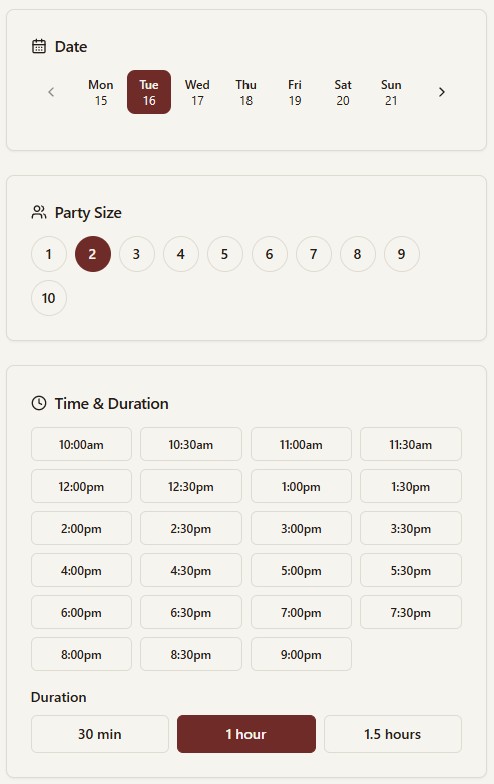
What it does:
- A 7-day sliding calendar window with 30-minute time slots and selectable durations (30, 60, or 90 minutes)
- Party sizes from 1 to 10; form layout adapts automatically for mobile screens
- When a slot is full, up to 3 nearby alternatives are surfaced automatically
- A review-and-confirm dialog before submission, with optional Cloudflare Turnstile CAPTCHA for bot protection
- Confirmation email sent immediately on booking, with a secure link to manage the reservation
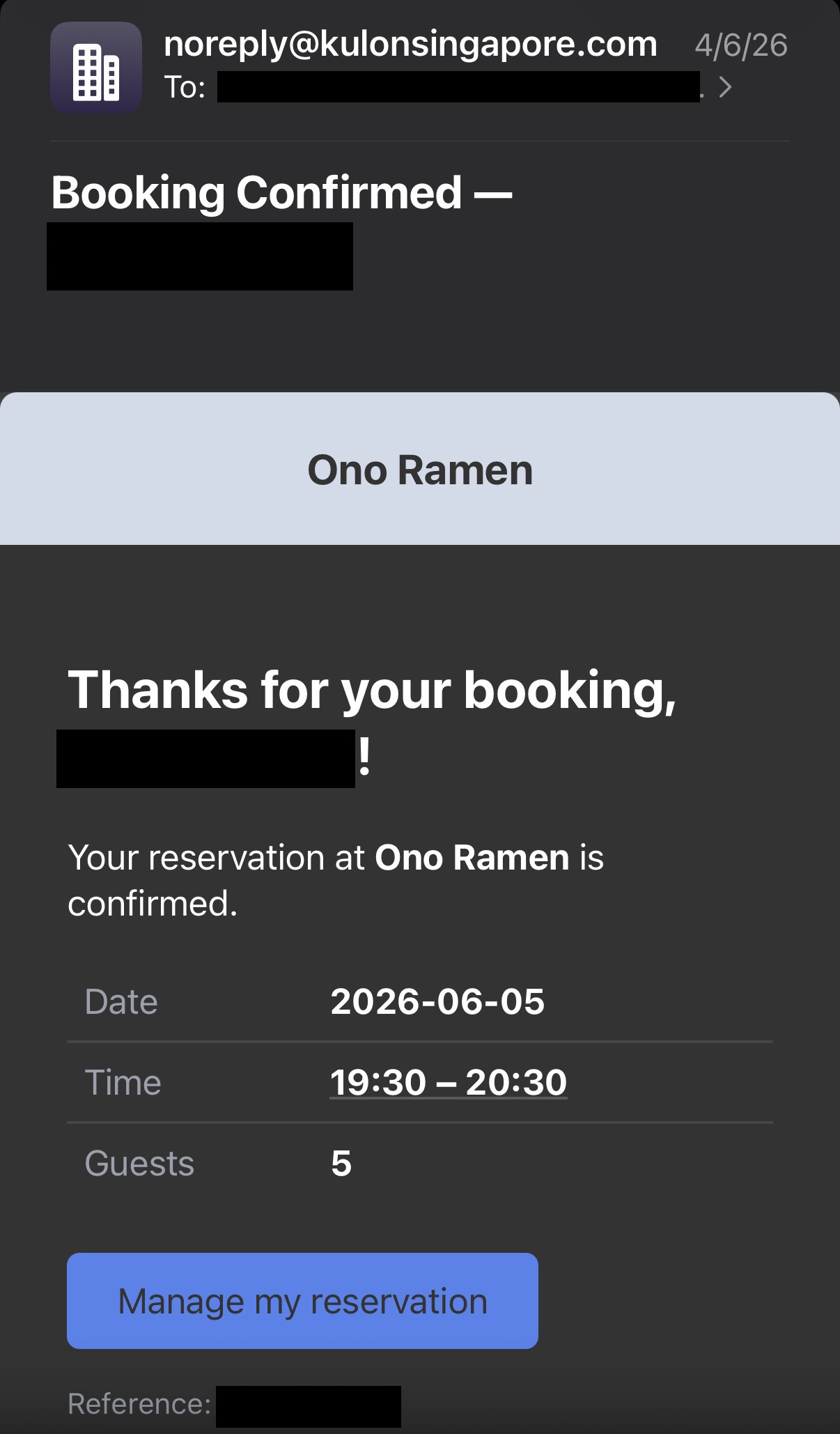
Managing reservations without an account:
Customers can access their reservation two ways — via a secure token link in their confirmation email, or by requesting a 4-digit OTP sent to their email. From there they can edit the date, time, duration, party size, or special requests, or cancel outright. Cancellations are locked within 1 hour of the booking time. Automated 24-hour and 2-hour reminder emails are sent via a background cron job.
Staff Dashboard
The dashboard was built to be genuinely useful across a full restaurant workday — not just a data dump, but an operational tool.
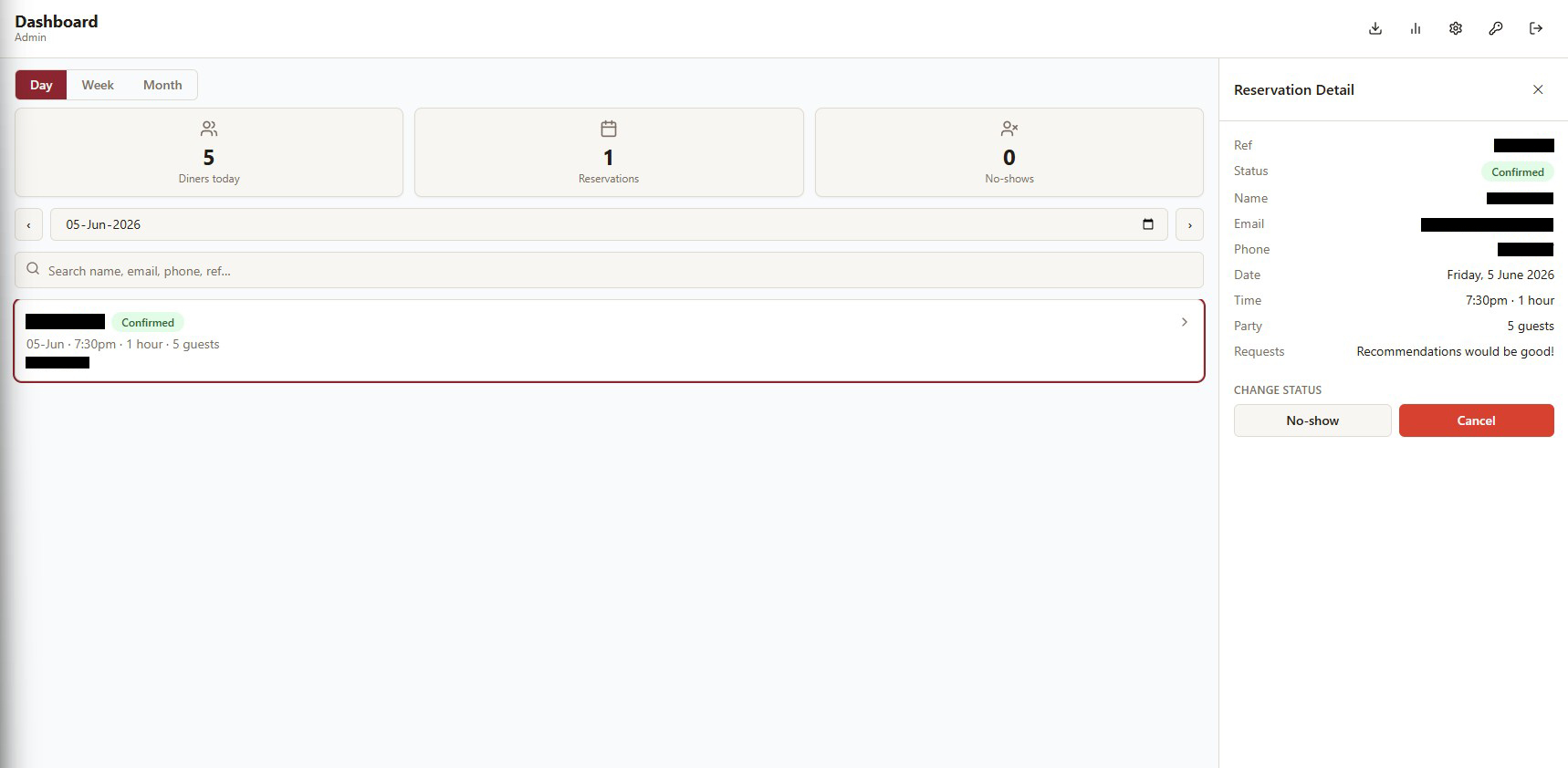
Day, week, and month views:
- Day view — Searchable reservation list (by name, email, phone, or reference number) with a stats bar showing diner count, reservation count, and no-shows. Reservation detail opens as a sidebar on desktop and a bottom modal on mobile.
- Week view — 7-day grid with icon-annotated diner and reservation counts, colour-coded by capacity utilisation.
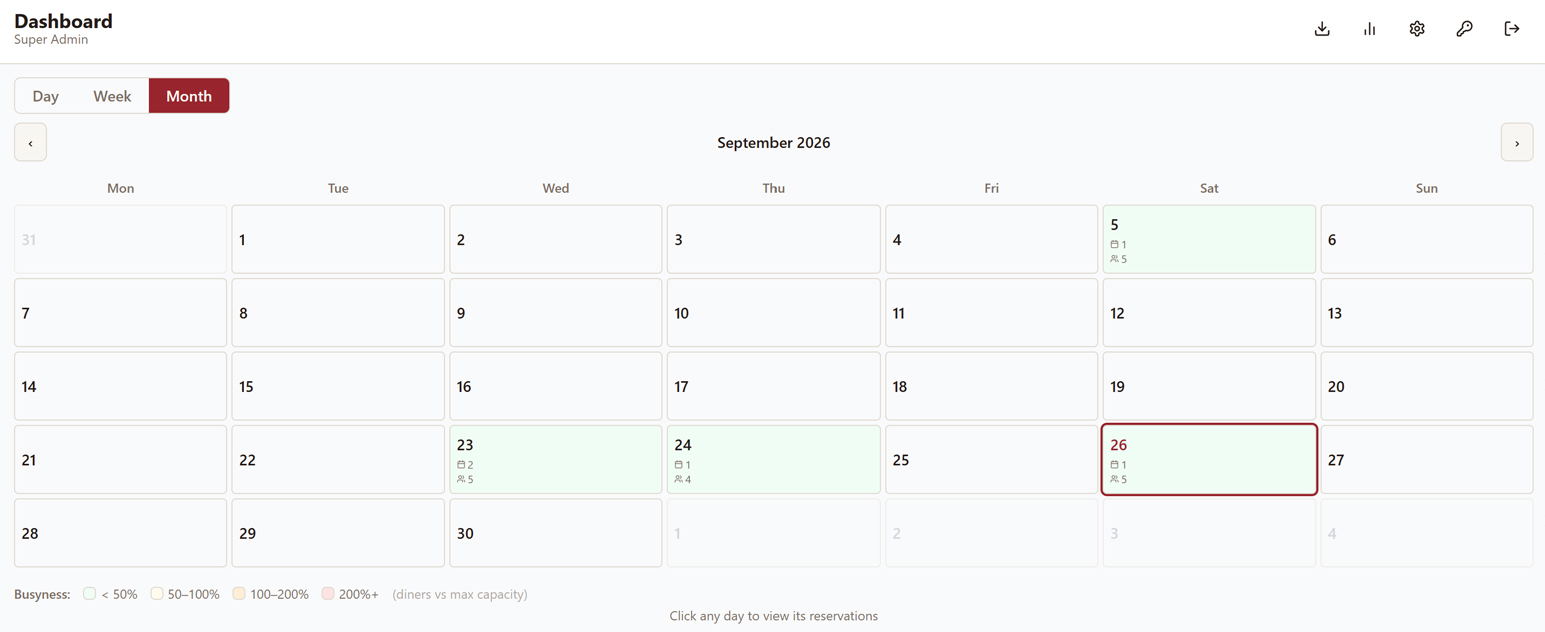
- Month view — Calendar overview with a busyness heatmap; cells scale down gracefully on narrow screens.
Status and exports:
Staff can mark reservations as confirmed, completed, no-show, or cancelled directly from the dashboard. Admins can download a full .xlsx export of reservations with complete change history. Access is role-controlled across three tiers: Super Admin, Admin, and Staff.
Analytics
Seven chart types give the restaurant real data on how it's performing — not just raw booking numbers.
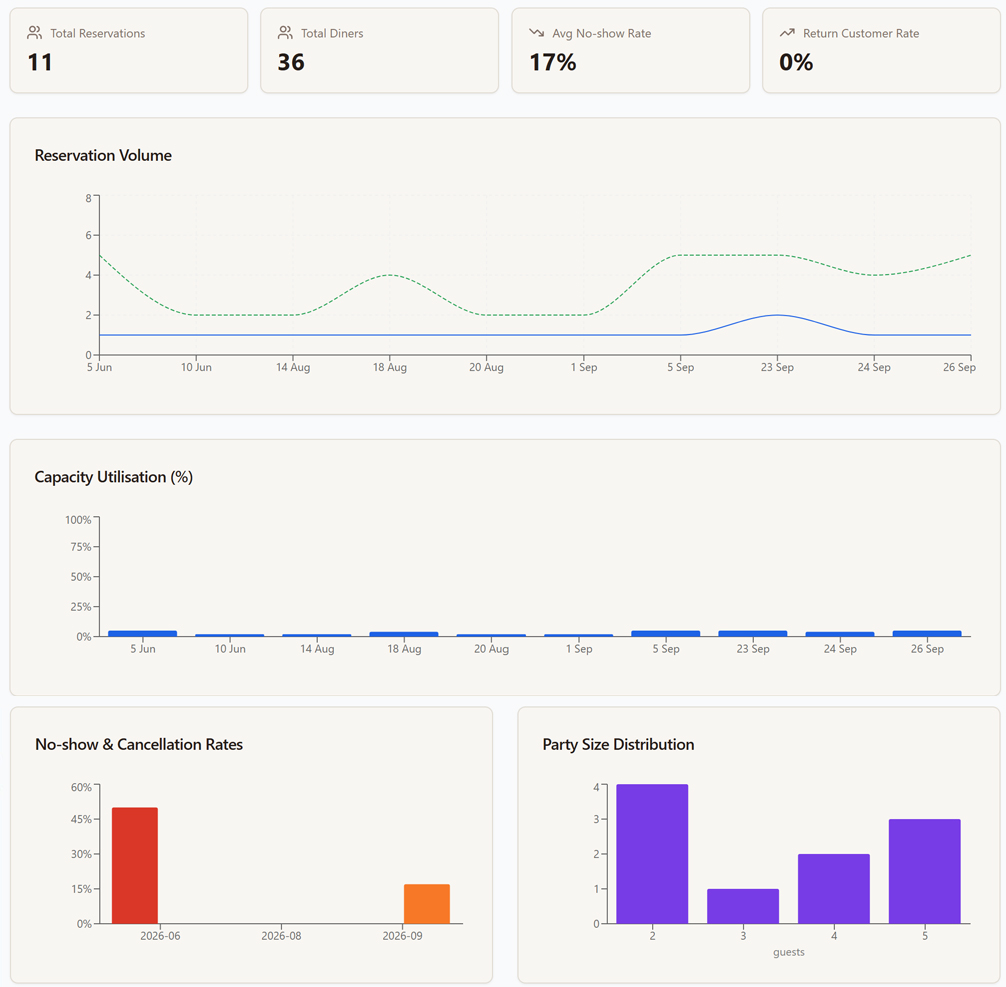
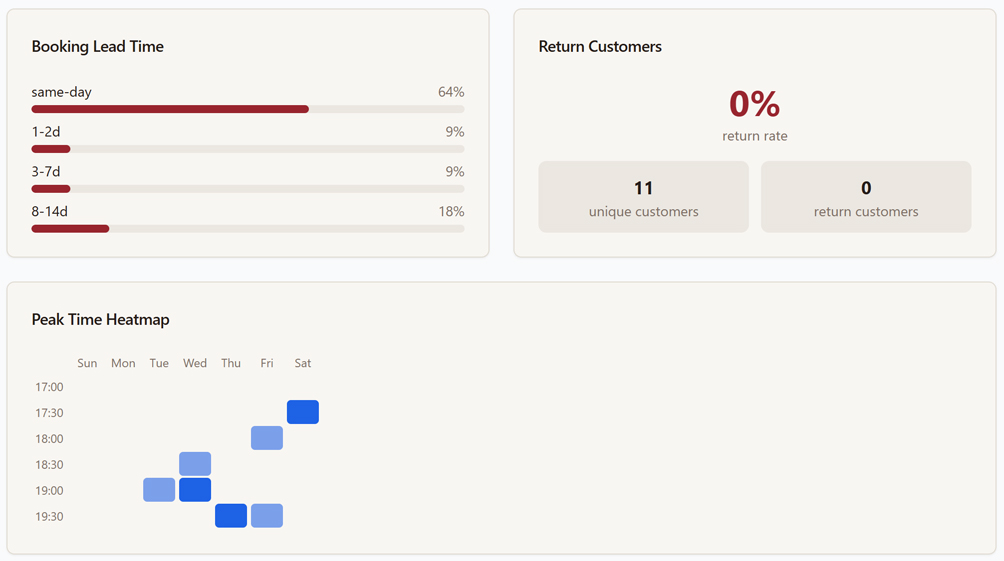
The analytics suite covers volume trends, capacity utilisation, no-show and cancellation rates, party size distribution, booking lead time, a peak time heatmap, and return customer rate. All charts are powered by Recharts and scoped to configurable date ranges.
Branding System
One of the more technically interesting parts of the project was building a fully dynamic branding system. All cosmetic settings are stored in the database and applied at runtime — no rebuild required.
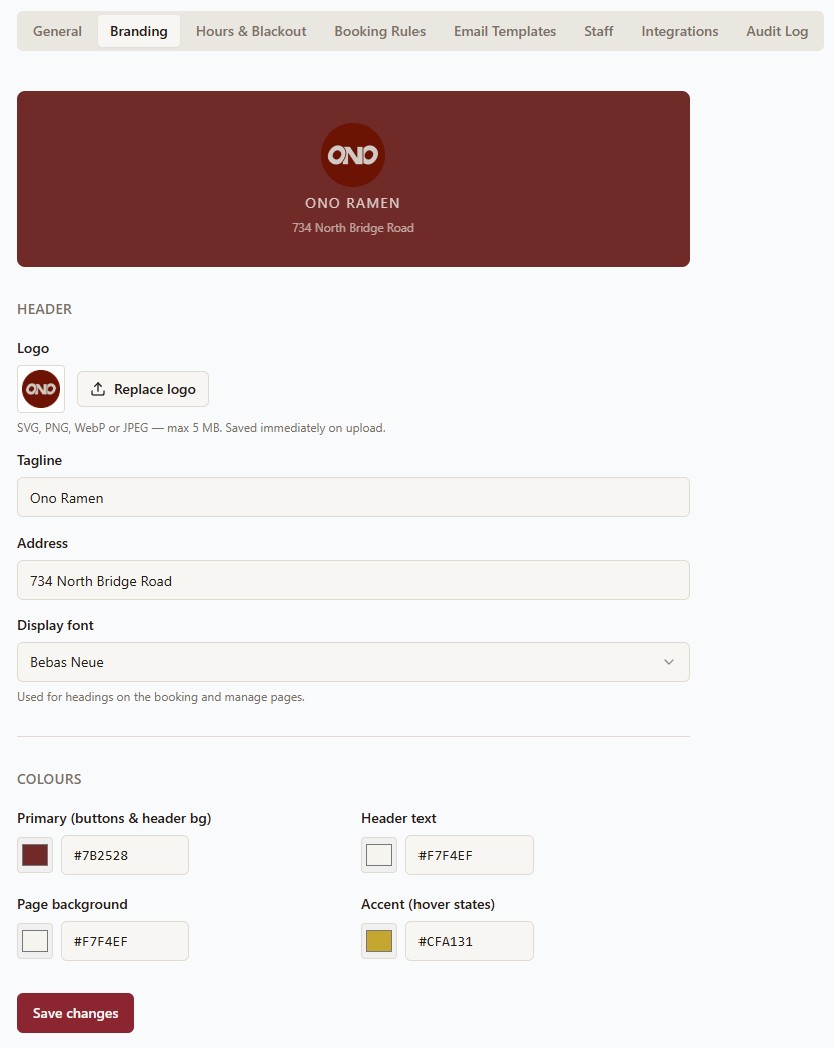
A public API endpoint returns the current brand config; a useBranding hook on the client fetches these settings and applies them as CSS custom properties on document.documentElement. Colours are stored as hex and converted to HSL at runtime so Tailwind and Radix components can correctly derive hover and muted variants. The selected Google Font is injected dynamically. The favicon mirrors the uploaded logo automatically.
Configurable without touching code:
Logo (SVG, PNG, WebP, JPEG), tagline, address, display font (8 Google Font options), primary colour, header text colour, page background colour, and accent colour.
The default theme for Ono Ramen uses a deep crimson (#7B2528), warm cream (#F7F4EF), warm gold accent (#CFA131), and Bebas Neue as the display font.
Settings & Integrations
A 9-tab settings panel covers every configurable aspect of the system.
| Tab | What it controls |
|---|---|
| General | Restaurant name, contact info, SMTP email config |
| Branding | Logo, colours, font, tagline, address |
| Hours & Blackout | Operating hours per day, blackout dates with conflict alerting |
| Booking Rules | Party size limits, slot duration options, advance booking window |
| Email Templates | Fully customisable transactional email HTML via TipTap rich text editor |
| Staff | Create, edit, and delete staff accounts; role assignment |
| Integrations | Google Calendar OAuth connection; iCal feed URL |
| Audit Log | Paginated log of all staff actions |
| Danger Zone | Rate limit toggle, reservation purge (Super Admin only) |
Google Calendar integration syncs reservations as calendar events automatically. Edits and cancellations update or delete the corresponding event. A background sync job runs every 30 minutes to catch any missed events. OAuth tokens are encrypted at rest. An iCal feed is also available for any third-party calendar app.
Tech Stack
Frontend
React 18 · TypeScript · Vite · React Router · TanStack Query · React Hook Form + Zod · Radix UI · Tailwind CSS · Recharts · TipTap · date-fns · Cloudflare Turnstile
Backend
Express · TypeScript · Prisma ORM · PostgreSQL · JWT + bcrypt · Helmet · CORS · Rate limiting · Nodemailer (SMTP) + Resend (fallback) · Google Calendar API · ExcelJS · Zod
Infrastructure
Railway (Nixpacks build) · Railway PostgreSQL · Single Node.js process serving API + SPA · prisma migrate deploy on every deploy
Security Considerations
Several security measures were built in from the start rather than added on:
- JWT-based staff authentication with bcrypt password hashing and account lockout tracking
- Role-based access control across three tiers (SUPER_ADMIN / ADMIN / STAFF)
- Customer reservations accessed via SHA-256 hashed secure tokens, never raw IDs
- OTP codes for customer self-service are short-lived and single-use
- Cloudflare Turnstile CAPTCHA on the booking form (optional, togglable)
- Helmet, CORS, and express-rate-limit on the Express layer
- OAuth tokens for Google Calendar encrypted at rest
- Cron endpoints protected by a secret key in production
- Cancellation lockout window prevents last-minute manipulation
Outcome
The app went from PRD to live deployment, fully integrated into the client's website. Staff moved off manual tracking entirely. The client gained real visibility into their reservation patterns, peak times, and no-show rates for the first time. The booking flow handles both the customer-facing experience and all staff operations from a single deployed service.
Ono Ramen is part of Kulon Pte. Ltd., a Singapore-based F&B brand. Kulon Bakmi, its sister brand, has been featured in Time Out Singapore's "Recommends" list from 2020 to 2023.